Now you all can invite me on skype for any kind of help required as my username is krackoworld


Showing posts with label Security Tips. Show all posts

22 October 2015

How to make a business successful with the help of a cell phone


By the grace of God,I am a successful businessman.Whoever I meet, they always have plenty of questions to ask me. To my astonishment, the most obvious question is not, “What is the reason behind your success”. In fact the question that people ask me most frequently is, “How do you control your employees”. Well, this simple question has one simple answer and that is, “Keep an eye on your employees by buying a cell phone spy software Xnspy.”


21 April 2014

How to Protect Yourself From the Heartbleed Bug or Attack


heartbleed bug Are you aware of Heartbleed Bug or not? If not, then this article is for you only. Well this is a very new bug out at the Internet and exposing everything about a user or website. Actually The Heartbleed Bug is a serious vulnerability in the popular OpenSSL cryptographic software library. This weakness allows stealing the information protected, under normal conditions, by the SSL/TLS encryption used to secure the Internet. So lets read its prevention and other info below.

How it Works?

The Heartbleed bug allows anyone on the Internet to read the memory of the systems protected by the vulnerable versions of the OpenSSL software. This compromises the secret keys used to identify the service providers and to encrypt the traffic, the names and passwords of the users and the actual content. This allows attackers to eavesdrop on communications, steal data directly from the services and users and to impersonate services and users.

Why it is called the Heartbleed Bug?

Bug is in the OpenSSL's implementation of the TLS/DTLS (transport layer security protocols) heartbeat extension (RFC6520). When it is exploited it leads to the leak of memory contents from the server to the client and from the client to the server.

How to Check your Site If they are are Vulnerable?

1.) First of all check if the sites you use every day on an individual basis are vulnerable to Heartbleed bug or not using http://filippo.io/Heartbleed/, and if you're given a red flag, avoid the site for now.
2.) LastPass also created a Web app that will tell you what kind of encryption a site uses, and when the encryption was last updated.
3.) Provensec also created a scanner at http://provensec.com/heartbleed/
4.) GlobalSign SSL Configuration Checker.

STEPS TO PROTECT YOURSELF FROM HEARTBLEED

  1. First Change your passwords. ALL of them. This article from Mashable will get you started.
  2. As long as you’re changing passwords, use this opportunity to start using different passwords for every site. It’s really easy with LastPass, which has a terrific free version. A password utility like this will securely generate, store, and enter passwords for you. Once you’ve used it for a week, you won’t want to go back to memorizing all of your passwords or using the same password on multiple sites (Heartbleed shows just how dangerous that can be).
  3. Never reuse same passwords again in the future.
  4. OpenSSL version 1.0.1 through 1.0.1f and 1.0.2-beta1 are Vulnerable and flaw is fixed in OpenSSL 1.0.1g. If you haven't yet, please update your system that use OpenSSL for TLS encrypted communications.
  5. It is good to use the two-factor authentication, which means with the password, the account requires a freshly generated pass code that shows up only on your personal Smartphone, before getting into certain websites for financial transaction.

That’s it! Enjoy and Be Safe. Any Comments are welcomed below.


31 March 2014

How to Disable Country Restriction on Google Play


google-play-logo Exams are Over and its time to put up an interesting post on Disabling Country Restriction on Google Play and enjoy any type of apps. Recently I noticed lots of android Smartphone users complaining about that blocked market for the country restricted users, therefore after reading a lot I personally founded a way out. I know you all may be well aware that you can easily enable the access to country restricted android market via some third party application but some users are complaining that even these third party application after emulating the SIM to another USA carrier doesn’t work well etc. So here is an alternative way to do that right.

Procedure to Disable the Country Restriction at Google Play to Download Apps

  • First of all Download any type of third party SIM emulator like Market Access, Market Enabler etc. Try Googling I can’t give link here without the developer permission If you need help ask in the comments will email you!
  • Now After that downgrade your upgraded market in case if your ROM had old Google Market when installed/Flashed, Here I am assuming that you had previous version of Market before Upgrading to newer Google Play So in this Case go to Manage Applications and Simply select Google Play and uninstall any updates from there, It will be reverted back to Android Market.
  • hence Emulate your SIM using the above mentioned program in first step and then Search any country restricted application like Google Maps and try Installing. It will take much time and after couple of minutes, download will start automatically
  • Incase, You have preinstalled Google Play when you purchased a phone with latest ICS release, then please uninstall that using Titanium Backup and then drop comment here, to get the link for Old Market for Android. Well, Ok one link is being posted here, Cheers Download and Install it and then emulate the SIM and woa, Its Working…

Download Attached File

All Done! Enjoy Apps Everywhere.


15 January 2014

How to Be Anonymous at Internet : Top Ways


being anonymous Well After managing some time today, I am going to write this article! Now a days being a top hacker, its better to be anonymous to view blocked sites or stay un-traced! In simple words, Anonymous means unidentified or unknown. So being it means a lot to a hacker for various purposes, also other people i.e student’s can be anonymous as well to operate blocked sites at Labs, Office etc. There are also many other benefits of it like doing a anony comment or many more. Therefore today I am going to tell you the real ways on How to be Anonymous at Internet. Have a look below.

3 Ways: How to Be Anonymous at Internet

1. Using Proxy

Well a proxy server is a server (a computer system or an application) that acts as an intermediary for requests from clients seeking resources from other servers. In other words, A proxy is an address (IP address) of a Server and acts like a hub etc. We can be anonymous using various proxies. The best advantage of using proxy is that your real IP can be hidden and now work silently. This is also be used for connecting to the internet.

2. TOR Browser

Tor is free software for enabling online anonymity. Tor directs Internet traffic through a free, worldwide, volunteer network consisting of more than three thousand relays to conceal a user's location or usage from anyone conducting network surveillance or traffic analysis. In simple words, Tor-proxy is a free proxy-server service that Internet users can use to hide their IP address while surfing the Web. I just love TOR.

Must SEE- Bypass Cyberoam Security–TOR Browser

3. VPN

Well VPN stands for Virtual Private Network, Basically it’s a private network which lets users to connect to other users or remote sites using a public network usually internet. As per wiki, A virtual private network (VPN) extends a private network across a public network, such as the Internet. It enables a computer to send and receive data across shared or public networks as if it were directly connected to the private network. It is done by establishing a virtual point-to-point connection through the use of dedicated connection and encryption.

That’s it! Enjoy and Please share this with your friends and Comment…

Or Subscribe to our Blog here!


03 December 2013

Top 5 Must Have Iphone Security Applications 2014


top 5 iphone security apps Well after a very very long time, today I am here to introduce you some top 5 must have Iphone Apps of 2013-2014 etc. Sometimes we forget about our iPhones when it comes to security issue, but hackers, crackers and other bad guys don't forget this. As this result, criminals would love to get their hands in your iPhone with latest IOS release. Therefore these great security related iPhone apps helps you protect your iPhone, it's data, and even your home as well. Check it out now!

Top 5 Must Have iPhone Security Apps 2014:-

1. Find My iPhone

Here's a free way to find your lost iPhone, using another iOS device! Simply download this onto your iPad, iPod Touch or Mac, open it and log in with your Apple email ID. Find My iPhone will help you locate your missing device on a map, display a message, play a sound, remotely lock your iPhone or erase all your iPhone's data easily.

2. mSECURE

This app costs 9.99$ from the apple app store. This app has 256 bit blowfish encryption, auto-lock, password generator, cloud data protection, free backup utility, email attachment backup/restore, and optional self-destruct.

3. Alarm.com

The Alarm.com alarm system monitor and control application will let you arm, disarm, check the system's status and other tasks depending on what features you subscribe to. I just love this alarm.

4. Kryptos (for Secure VoIP calls)

Its free man! Kryptos is a Voice Over IP (VoIP) app for the iPhone that is intended to provide military-grade AES-encrypted phone calls (provided each party is using the Kryptos application to make and receive calls)

5. Pocket Cloud

Wow! This is the most expensive app on the list worth $14.99; however, it promises a secure and fast way to remotely connect, access files, pictures and applications with a simple installation, security and RDP/VNC compatibility etc.

All Done! Enjoy and Please share…


26 October 2013

Hacker stole $100K from Users of California using SQL Injection Method


After a long time since my B.Tech Exams are over, Today I am going to write on a latest news that is how Hackers stole 100,000 $ from California users Based ISP using SQL injection. Now a days SQL injection being an easy and weakness on the web against Hacking! In 2013 we have seen a impressive improve in the variety of crack strikes tried against financial institutions, lending institutions and power organizations using various methods such as DDoS attack, DNS Hijacking, SQL injects and Zero-Day exploits as well. So lets know this one story below-


30 September 2013

Tips To Keep In Mind If You Are Using Your Password on Others Pc


computer password safe The internet has become a very integral part of our lives. With it you can transact business, communicate with families and friends, you can do your research and studies: it has essentially become a very important part of our lives. To use these internet resources, we need to open user accounts/profile which we can only access using passwords.

However, there are other internet users whose main intentions are to cause harm, spread viruses, and steal private information to use for harm or a number of various reasons. Such users may be referred to as hackers, profile impersonators and many other names. As an experienced and informed computer and internet user, you may have taken precautions against such malicious intentions, but it is not always you will access your online emails, profiles, Web pages or any other resources you need the internet for. In the event you gain access through other people’s computers or public computers then you need to take precautions to protect your password.

How to Protect your Password on a Shared Computer

The following are some of the steps you need to take while using shared computer to access your online and sensitive information.

  • Ensure that the browser is not set to remember your username and password automatically. This will enable subsequent access to your account even after you have logged out after using it. Most browsers come with the feature of allowing you to fast access your account by automatically filling in your username and password on the subsequent logging in after the first time. Ensure your initial logging into your account using a computer which is not yours, that you do not instruct the browser to automatically remember password.
  • Always ensure that you click log out once you are done with your online user account. Closing the browser window or typing in a new URL in the browser will not necessarily log you out of your account. Most social media and email account have automatic login capability, thus the next computer user will easily access your account if you did not logout.
  • Check whether the computer you are using has anti-spy software, and if it does, ensure that it is updated to the latest version or at least a version that is quite previous. This is because the computer you are using may be having a spyware installed, with or without the owner's knowledge. If you must access you online information using a computer that is not yours, ensure that at least it has a reputable anti-spy software running.
  • It also helps to erase your tracks once you are done using the computer. There are a number of ways of doing this, the simple one is by browsing with privacy settings on. This will enable the browser and the computer not to keep history and cookies information about your activities online. Another method is by clearing recent browser history and cookies on your own. You go to the browser setting and click on delete browser history, and thus delete all the history that pertains to the activities you were doing online.
  • Never save information about your password on somebody’s computer. Some users have difficulty keeping their password in their head, thus prefer writing it down especially on Window’s tools such as Sticky Notes, Notepads and WordPad’s. Especially when they are creating a new account/profile in a new platform and it so happens they create such account/profiles on somebody’s computer. Writing down and saving your password on somebody’s computer is highly insecure since the owner may come across it after you are done and thus easily access your information.

These are some of the measures you should take to ensure nobody get knowledge of your password information. The key measure is to use your prudence such as don’t disclose your password to anybody else, when typing your password ensure nobody is looking at the keyboard or is behind you. For further assistance on password protection, you may contact Technology Helpdesk by calling one of their tech support numbers.


31 July 2013

How to Bypass Mobile Phone Number Verification


bypass mobile number verification Are you Looking for Mobile Phone Number Verification to save your own personal information to be leaked out? If yes, then post is all yours! Now a days its being the main criteria of popular websites like Gmail, Facebook and many more to get yourself verified via Mobile Number Code Sent, hence to avoid it there are so many sites exits which can create your secret mobile number online and access to your inbox etc. There today I am going to mention that sites to bypass mobile phone number verification easily by making a free account on them. Have a look!

Some Benefits of these Sites to Bypass Mobile Number:

1. Bypass Gmail Mob. Number Verification

2. Bypass Facebook Mob. Number Verification

3. Bypass YouTube Mobile Number Verification

4. Bypass Skype Verification

5. Bypass Ymail, Rediff, Elance and many more

Top Sites to Bypass Mobile Number Verification are-

1. Pinger

2. Receive SMS Online

3. Lleida Free SMS

4. Sellaite SMS Receiver

That's it! Enjoy…


15 June 2013

How to Hack iPhone iOS 7 to Bypass Lock Screen


Hacking iPhone to bypass iOS 7 Lock Screen With the release of new iOS 7 there are lots of bugs and things which still need to be fixed by apple but in between Forbes has discovered some new hack/way of bypassing Lock Screen in iPhone iOS7. The all-new Apple iOS 7 launched at WWCD 2013 this week and Just after 48 hours of iOS 7 release, Jose Rodriguez iPhone user able to hack and bypass Lockscreen to access the Photos in just a few seconds. Well this is a great security problem of Apple iPhone.

Therefore Forbes points us to a new video showing how to completely bypass the iPhone’s password protection by accessing the calculator application available at the lock screen etc.


In Short,

"By opening iOS’s Control Room and accessing the phone’s calculator application before opening the phone’s camera, anyone can access, delete, email, upload or tweet the device’s photos without knowing its passcode."

So my suggestion is that to not to use Apple iPhone iOS7 for now as it is totally buggy…Apple says that the beta version should be removed completely in the September 2013. Till then Peace!!!

Also SEE- How to Unlock New iPhone 5 with AT&T Easily


25 May 2013

What is Zero Day Attack or Exploit?- Know its Prevention


zero day attack A zero-day (or zero-hour or day zero) attack is an attack that exploits a previously unknown vulnerability in a computer application, i.e the attack occurs on "day zero" of awareness of the vulnerability. This means that the developers have had zero days to address and patch the vulnerability. Zero-day exploits (actual software that uses a security hole to carry out an attack) are used or shared by attackers before the developer of the target software knows about the vulnerability etc.

Ordinarily, when someone detects that a software program contains a potential security issue, that person or company will notify the software company (and sometimes the world at large) so that action can be taken. Given time, the software company can fix the code and distribute a patch or software update. Even if potential attackers hear about the vulnerability, it may take them some time to exploit it; meanwhile, the fix will hopefully become available first.

Sometimes, a hacker may be the first to discover the vulnerability. Since the vulnerability isn't known in advance, there is no way to guard against the exploit before it happens. Companies exposed to such exploits can, however, institute procedures for early detection:

  • Use virtual LANs (IPsec) to protect the contents of individual transmissions.
  • Deploy an intrusion detection system (firewall).
  • Introduce network access control to prevent rogue machines from gaining access to the wire.
  • Lock down wireless access points and use a security scheme like Wi-Fi Protected Accessor WPA2 for maximum protection against wireless-based attacks.

Zero Day Attack Prevention tips:

1. "Multiple layers" provides service-agnostic protection and is the first line of defense should an exploit in any one layer be discovered. An example of this for a particular service is implementing access control lists in the service itself, restricting network access to it via local server firewalling (i.e., IP tables), and then protecting the entire network with a hardware firewall. All three layers provide redundant protection in case a compromise in any one of them occurs.

2. The use of port knocking or single packet authorization daemons may provide effective protection against zero-day exploits in network services. However these techniques are not suitable for environments with a large number of users.

3. Whitelisting effectively protects against zero day threats. Whitelisting will only allow known good applications to access a system and so any new or unknown exploits are not allowed access. Although whitelisting is effective against zero-day attacks, an application "known" to be good can in fact have vulnerabilities that were missed in testing. To bolster its protection capability, it is often combined with other methods of protection such as host-based intrusion-prevention system or a blacklist of virus definitions, and it can sometimes be quite restrictive to the user.

4. Engineers and vendors such as Gama-Sec in Israel and DataClone Labs in Reno, Nevada are attempting to provide support with the Zeroday Project, which purports to provide information on upcoming attacks and provide support to vulnerable systems.

5. Keeping the computer’s software up-to-date is very important as well and it does help.

6. Users need to be careful when clicking on links or opening email attachments with images or PDF files, even if the sender is someone they know. This is how many cyber criminals deceive users, by pretending they are something they are not and gaining the user’s trust, as well as having a virus or other malware email copies of itself to the address lists of infected victims.

7. Utilize sites with Secure Socket Layer (SSL), which secures the information being passed between the user and the visited site.

That’s it!


09 May 2013

5 Tips to Prevent Online Account Hacking-Taking Hacking Efforts to the Base of Humiliation


online account hacking Hacking

Basically, with the changing face of technology, many online resources are increasingly falling victim due to many hacking due to attempts. Indeed, due to the failure of many online enterprises as well as persons to have a stable, highly integrative security systems on their accounts, hackers are taking advantage of weak access points leaving destruction beyond imaginations. But can that be curbed? A question is rattled by many. Well, with a particular focus on many online niches, certain efforts have proven worthwhile in preventing online account hacking. Let's take a look.

Preventing Hacking on Online Accounts


The first step of preventing hacking on online accounts is to keep vigil on the running accounts on your computing systems. This tip has seen many online accounts emerging as strong programs to bring rapid time to value in efforts to curb online accounts. This is because every single program in the internet launches a process that displays any information together with account access points in the windows task manager. Therefore, keeping vigil of the running processes can help identify any hacking attempts as well as increase operational performance to security systems.


Computer protection through strong and impermeable security software might prevent advanced hackers from cracking into platforms with sensitive data and online accounts. An antimalware application as well as an antivirus (the latest version) provide a standardized, industry-leading practice delivery security mechanism that enables your account to offer fixed-scope security capabilities hence preventing any hacking practices. For instance, the child tax credit helpline has redefined value for customers as well as preventing hacking by having a strong bond of security system through malware applications and related security software.


As if this is not enough, the use of strong passwords that are well equipped by physical personal identifiers like voice and fingerprint identifier metrics has also shown continued ability to prevent spammer hacking efforts. In fact, such metrics strengthen the passwords hence preventing other computer crimes like cracking, industrial espionage, piracy and even fraud. Although strong passwords offer one of the best approaches in preventing hacking, it is true that serious and competent hackers will still find way to online accounts by using the key logger application. Therefore, weakening key logs by making use of unique passwords made up of a combination of letters, symbols, and numbers will be a technological initiative that will have an immediate impact on hacking.


Unprotected public networks, which have become the order of the day in the provision of free Wi-Fi and other web access protocols, are threat to online accounts. Through the special software, a hacker sitting in the same cyber café with you can gain access to all your password at a time when you are trying to access certain accounts. But how is it possible? Well, public networks are unprotected and attract a lot of people which make them prone to hacking therefore should never be used for online shopping, banking or even in many email forms.


Finally, it is no secret that many hackers are advancing towards freeware which occurs in many forms of downloads. This means that free downloads and other no-fee applications are being used by hackers to gain an internal metric in many accounts, both enterprise based and personal. Therefore, minimizing interactions with free downloads and applications will reduce the level of risk posed by online account hackers. With all these approaches, you can now redefine and expand your online account security by enabling industry-focused solutions to cut short and handicap any hacking efforts.


05 May 2013

Tips to Improve the security of your WordPress Blog and Make Bullet Proof


wordpress security tips Well Security is not really a massive issue until your blog starts becoming popular. If you start receiving a decent amount of traffic, your blog will become the target of online malcontents. Traffic may be turned into cash online via a large number of various (and sometimes nefarious) routes. It is good practice to start as you mean to go on and introduce blog security from the outset. Here are some tips that anyone can use, even if you are not technically/programmatically trained.


30 April 2013

How to Make Money with Google Chromium Bounty Programs


Google bug bounty for Chrome bugs Now a days its becoming trend to pay to those smart hackers who can find and fix vulnerability in their systems. Recently Google has also opened that type of program in which they already paid around $300,000 etc. Therefore, every person will get the bounty of $500 for each vulnerability they report in the Chrome browser and its underlying open-source code. This is known as Chromium Vulnerability Rewards Program.

The Purpose of The Program

This Vulnerability Rewards Program was created to help reward the contributions of security researchers who invest their time & effort in helping us to make Chromium more secure. Through this program we provide monetary awards and public recognition for vulnerabilities responsibly disclosed to the Chromium project and many more.

Some FAQ’s

What reward might I get?

Our base reward for eligible bugs is $500, but the typical payout is usually at least $1000. If the rewards panel finds the bug particularly severe, the value can be as much as $3133.70. Or if the rewards panel finds a report really impressive, the value can be as much as $10,000 or even beyond. To ensure the greatest chance at the maximum possible award please adhere to the guidelines provided in the Reporting Security Bugs.

What bugs are eligible?

Any security bug may be considered. We will typically focus on High and Critical impact bugs, but any clever vulnerability at any severity might get a reward. Obviously, your bug won't be eligible if you worked on the code or review in the area in question.

Who pays for the awards program?

As a consumer of the Chromium open source project, Google sponsors the rewards.

How do I find if out my bug was eligible?

You will see a provisional comment to that effect in the bug entry once we have triaged the bug etc.

What if someone else also found the same bug?

Only the first report of a given issue that we were previously unaware of is eligible. In the event of a duplicate submission, the earliest filed bug report in the bug tracker is considered the first report.

For more information, please Visit Here.

Also Read- How Hackers can Make Money with PayPal Bug Bounty Programs?


24 April 2013

Pirate Bay Co-founder Charged for Hacking Machines & Stealing Money


The Pirate Bay co-founder charged with hacking and stealing money Recently Pirate Bay co-founder Gottfrid Svartholm Warg was charged with hacking the IBM mainframe of Logica, a Swedish IT firm that provided tax services to Swedish government, and IBM mainframe of the Swedish Nordea bank, the Swedish public prosecutor. Also Besides Svartholm Warg, the prosecution charged three other Swedish citizens as well.

According to the prosecutors, IBM mainframes belonging to Logica and the bank were targeted in the attacks, which are said to have begun in 2010, and continued until April 2012. The Swedish authorities have claimed that it is the biggest investigation into a data intrusion ever conducted in the country.

Prosecutor Henrik Olin Says that,

"A large amount of data from companies and agencies was taken during this hack including a large amount of personal data, such as personal identity numbers of people with protected identities... I'd say that Svartholm Warg is the main person and brains behind the hacker attack."

In total, the four men allegedly attempted to transfer a little over 680,000 Euros to different bank accounts. Therefore Court proceedings against Svartholm Warg and the other three are expected to begin at the Nacka district court at the end of May, Olin said.

That’s it!


17 April 2013

WordPress Blogs Under Botnet Attack and Prevention


botnet attack All the world knows that WordPress is one of the best blogging platform ever, now due to it its Hacking is becoming common now a days. In a recent post, Matt Mullenweg posted about the recent attack on WordPress sites. This is a botnet attack, and is performing brute force attack using default WordPress login (admin). A large botnet with more than 90k servers is attempting to log in by cycling through several passwords and usernames. So lets learn more on it below-

What is Botnet Attack?

  • Bot master: Usually the hacker who operates all infected computer.
  • Zombies computer/Bot: System which are infected by the Bot master, and helps in spamming. Usually owner of computers are unaware of the fact, that they are compromised. It could be anyone computer, including yours etc.

    How to Prevent WordPress from brute force attack?

    1. Install Limit login attempt plugin, hence it blocks individual I.P., in this botnet attack, hackers are running the attack using 90,000+ I.P.

  • 2. Use .htaccess to protect your admin pages and rename the login pages.

    3. Change your WordPress default username also

    4. Enable two-step authentication and

    5. Always use a complex password etc.

    That’s it! Also don’t forgot to make a backup of your blog for some extra security. Peace!


    04 April 2013

    World's biggest DDoS Attack Ever in the World


    DDoS attack Do you know my friends that last week it has been seen probably the largest distributed denial-of-service (DDoS) attack ever on Internet. Around 300Gbps was thrown against Internet blacklist maintainer Spamhaus' website but the anti-spam organisation , CloudFlare was able to recover from this attack and get its core services back up and running etc.

    The Spamhaus Project is an international organization based in both London and Geneva, founded in 1998 by Steve Linford to track email spammers and spam-related activity. The name spamhaus, a pseudo-German expression was coined by Linford for an Internet service provider, or other firm, which spams or knowingly provides service to spammers.

    “In the Spamhaus case, the attacker was sending requests for the DNS zone file for ripe.net to open DNS resolvers. The attacker spoofed the CloudFlare IPs we'd issued for Spamhaus as the source in their DNS requests. The open resolvers responded with DNS zone file, generating collectively approximately 75Gbps of attack traffic. The requests were likely approximately 36 bytes long (e.g. dig ANY ripe.net @X.X.X.X +edns=0 +bufsize=4096, where X.X.X.X is replaced with the IP address of an open DNS resolver) and the response was approximately 3,000 bytes, translating to a 100x amplification factor."

    Read also- How to Flood a Website with Denial of Service Attack

    Thats it!


    13 March 2013

    Facebook OAuth Vulnerability


    If anyone can Remember the last OAuth Flaw in Facebook that allows attacker to hijack any account without victim's interaction with any Facebook Application, was reported by white hat Hacker 'Nir Goldshlager'. After that Facebook security team fixed that issue using some minor changes. Now Yesterday Goldshlager once again pwn Facebook OAuth mechanism by bypassing all those minor changes done by Facebook Team. He explains the complete Saga of hunting Facebook bug in a blog post. So please must see.

    What is OAuth Vulnerability?

    Well OAuth URL contains two parameters i.e. redirect_uri & next, and using Regex Protection (%23xxx!,%23/xxx,/) Facebook team tried to secure that after last patch.

    Actually He uses facebook.com/l.php file (used by Facebook to redirect users to external links) to redirect victims to his malicious Facebook application and then to his own server for storing token values, where tokens are the alternate access to any Facebook account without password.

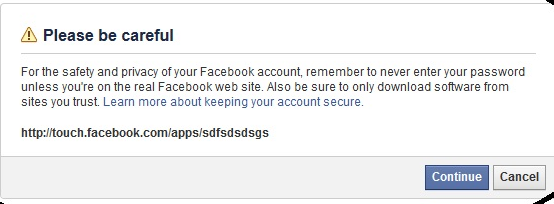
    warning

    But a warning message while redirecting ruin the show ! No worries, he found that 5 bytes of data in redirection URL is able to bypass this warning message.


    Example:  https://www.facebook.com/l/goldy;touch.facebook.com/apps/sdfsdsdsgs (where 'goldy' is the 5 byte of data used).


    Now at the last step, He Redirect the victim to external websites located in files.nirgoldshlager.com (attacker server) via malicious Facebook app created by him and victim's access_token will be logged there also. So here we have the final POC that can hack any Facebook account by exploiting another Facebook OAuth bug and many more.


    For Browsers:
    https://www.facebook.com/connect/uiserver.php?app_id=220764691281998&next=https://facebook.facebook.com/%23/x/%23/l/ggggg%3btouch.facebook.com/apps/sdfsdsdsgs%23&display=page&fbconnect=1&method=permissions.request&response_type=token

    Latest News: This bug was also reported to Facebook Security Team last week by Nir Goldshlager and has fixed now. Thanks!


    27 February 2013

    How To Bypass Sharecash Survey 2013


    Unlock ShareCash Survey 2013 Hi Friends after a long time I am posting again on Bypassing Sharecash Survey in 2013. Last month Lots of People sending emails to me regarding this issue, that’s why today I'm going to tell you one more trick for completing or unlocking sharecash.org Surveys very fastly and easily. Here I am using Hotspot Shield trick. So lets know and try this method below. Enjoy!

    Unlock sharecash.org survey : Bypass ShareCash Surveys

    1. Sharecash gives surveys that require phone verification if you are not from the USA. We will need a VPN to change our IP to get a US IP easily. We will be using a free VPN called Hotspot Shield. Note - If you are from the US, skip this step.

    2. Now download Hotspot Shield at here. Make sure to click the box that says "Fix Page Not Found Errors" as this error may come up a lot.

    3. Hence install it and run Hotspot Shield to press the connect button.

    4. Here Wait for it to say "State: Connected". After it has been connected, go to any site and this should appear.

    demo 5. Then enter sharecash link in your browser like Chrome, FireFox etc and choose a survey. The easiest way to unlock it is when they show food related surveys like "which on is better coke or pepsi" or something like that.

    6. After clicking it, go to the site fakenamegenerator and click on "Generate" button (make sure you've selected USA as your country").

    7. Now go back to the Survey you chose, and fill-up the information that you've generated on Step 5 After that click on "Submit" button.

    8. All Done! Just go back to the download page and let it Refresh more than 2 times and the survey will unlock. If it doesn't, just try one more time.

    That’s it! Peace and Blessings…Comments are Welcomed below.



    19 February 2013

    What is the difference between WEP and WAP Encryption?


    WAP VS WEP
    In this world, some people (usually hackers) are still confused between WEP and WAP type of Encryption that's why today I am going to write an detailed post on it later below. WEP stands for Wired Equivalent Privacy and WAP stands for Wireless Application Protocol mainly. Both are the security encryption used by the browsers. So lets differentiate them below.


    03 February 2013

    How to Bypass Safety Mode in YouTube to See Videos?


    youtube safety mode Are you Getting problems in watching YouTube Videos that requires Safety Mode feature, If You then you are the right place as Today I am going to tell you How to Bypass Safety Mode in YouTube to See as many videos you want without signing in to your Gmail account and confirming age etc. In this, we are not going to off/Disable Safety Mode, hence it’s just a trick to overcome it. Please have a look below and Share.


    Recent Posts

    Review this blog on Bloggers.com

    Recent Comments

    | KrackoWorld (KoW) © 2014. All Rights Reserved | Style By All Web Designing | | Contact |