Now you all can invite me on skype for any kind of help required as my username is krackoworld


Showing posts with label MAC. Show all posts

31 July 2016

How to Clean your Mac System Comprehensively


In case, you wonder why your Mac is running slow, you will need a good cleaning application. For cleaning up along with speed up your Mac, free up hard drive space, optimize your system and wipe out unnecessary files that you were unaware of; you will be required to download Mac cleaner from Movavi.


10 August 2014

Latest AnyKeylogger for Mac 2014: Free Download


antikeylogger for mac Industry is growing, that’s why more and more people are now using Apple Mac or Mac book, So this post is all for the Mac lovers. Therefore Hackers are more demanding for Mac apps, asking Keylogger developers to launch a keylogger for Mac etc. Hence Mac Keyloggers let us keep track or view of activities on Mac OS X 10.6.X. One of the most effective ways of stealing information is capturing keystrokes via Keylogger, hence Mac anti keylogger comes into play. Now this keylogger let you captures everything the user is doing - keystrokes, mouse clicks, files opened and closed and websites visited too. So lets learn more on this MAC Any Keylogger and its working plus downloading links etc. Have a look!

What is Any Keylogger for Mac?

This is known as The world's best keylogger software for Mac. With 6 basic but effective features Any Keylogger for Mac can help users record almost all activities happened on Mac in stealthy mode. Therefore Anykeylogger for Mac is a simple and user-friendly keylogger app, which can record Mac activities such as browsed sites, keystrokes and screenshots.

Now With simple interface and effective monitoring features, Any Keylogger for Mac has won a number of Mac users and awards. Any Keylogger for Mac is a good solution to Mac activity monitoring and many more.

How it Works?

Well Any Keylogger for Mac secretly works in the background process and cannot be detected by users as well as antivirus software too. It can record all activities on your Mac PC including texts typed, website visited, screenshots, send logs via email and applications launched etc. Thus It will automatically operate in 100% hidden mode when you boot up your Mac.

AnyKeylogger Features:

1. Take Screenshots

2. Record Browsed Sites History

3. Log Keystrokes

4. Record Program Activity

5. Send The Logs Via Email

6. Run in stealth Mode

How to Install and Use Anykeylogger to record Mac activities?

1. First of download and install the AnyKeylogger for Mac in your Operating System.

2. Now You will be prompted to install a monitoring tool. When you install the program, it will automatically run when your computer starts always.

3. Then Click on “Settings” in the main interface, choose “Common”, setup time intervals of screenshots, screenshots of visited web pages or activated windows. When done, you can close the settings window. Or you can define Hotkey combination to view logs here.
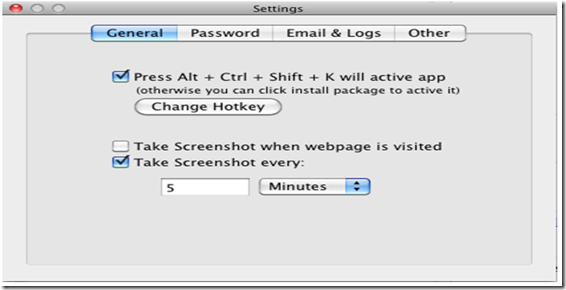
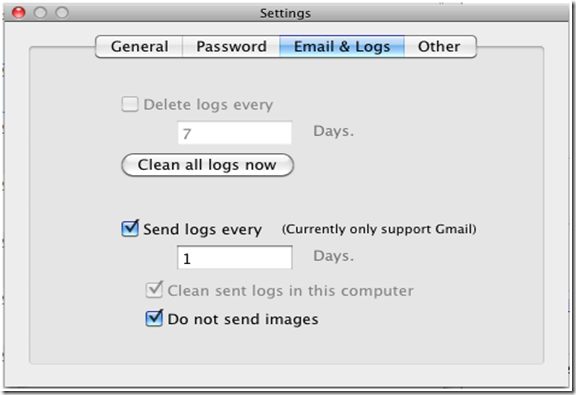
any keylogger for mac use 4. If you want to receive mails to your email address to remotely receive logs, click “Email & Logs”, there you can configure time intervals of automatic log deletion etc.
demo 5. Now View logs In the main interface, you can see all monitored logs at that place, just click one item you want to view and the detailed information will be shown on the right. That’s it!
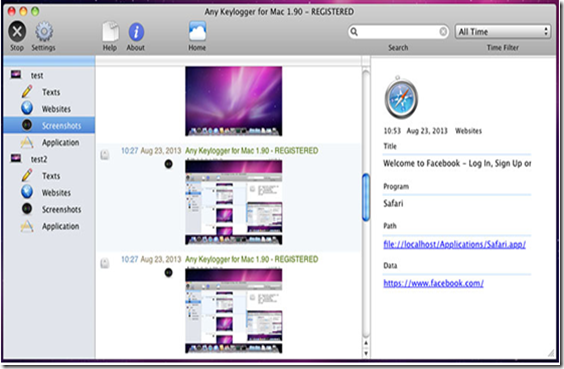
antikeylogger mac working All Done! Enjoy…If you want to buy full version, then you have to pay 29.95$ for it.

Final Words:

I hope you all liked my article on Keylogger for MAC OX, thus If you want to track children’s online activities to check whether they have browsed inappropriate sites. Or you just need a keylogger to record what you yourself have done on Mac, this is best for you. So what are you waiting for, just download the keylogger now and Have fun. If you have any doubts left in your mind, then let us know in the comments. Till then Good Bye.




20 June 2012

Top 50 Best Password Cracking Tools of 2012


password-crackingNow a days there are many password cracking tools available for cracking of account passwords in easy way but the problem is that either they are on paid terms or available at demo version only. Hence we need to crack it by patching or search some free one. Therefore to overcome this problem today KrackoWorld brings you the Top 50 collection of password cracking tools used mostly in 2012 and the good is thing is that all you get it free at one single place. Cheers!

15 June 2012

Configure Your Apache Servers with ApacheConf


apacheconfApache is the most popular powerful HTTP server software ever which provides many features like DBMS (Database Management System), Content negotiation and Virtual host etc. Apache has also built in search engine and an HTML authorizing tool that supports FTP mainly. Apache is developed and maintained by an open community of developers under the auspices of the Apache Software Foundation. The application is available for a wide variety of operating systems including Unix, Linux, Solaris, Mac OS X, Microsoft Windows, TPF and FreeBSD. Released under the Apache License, Apache is open-source software. Hence Apache was originally based on NCSA HTTPd code. Now today in this post i am going to tell you about ApacheConf which is used  to represents all the information from the httpd.conf file, from the included files, from the log files, .htaccess, .htpasswd and .htgroup in the structured view. It also represent password files of the users and more features has been available.


24 December 2011

MAC Data Recovery


Get you lost data back, without paying a single dollar!

While, quickly removing junk files from your hard disk, you may also mistakenly drag one of the important files into the trash bin and empty it, without even thinking of losing any important file. Oh! I deleted my important files! It happens almost with all of us. You think it’s gone into the ether? Well, that’s not the case, it’s still hanging in there, and you can get it back, without even getting freaked out.

All you have to do is to find a way out for your lost files… but the question is, how? It’s very simple. With the right data recovery tools; it’s just a matter of few clicks, but data recovery tools won’t come for free, right? What if you get one or may be two for free? Yes, if you have recently lost a file, and biting your nails to find a way, then stop and install either one of the tools mentioned below to get your lost data back again:

Test Disk & Photo Rec

Test Disk is an exceptional data recovery tool for Mac computers. You have to believe the power of Test Disk to restore lost files. Test Disk is specifically developed to retrieve data from lost hard drive partitions and fix the faulty disks, which fails to boot. Basically, all these issues are initiated by corrupt application, or errors caused by users, such as mistakenly removing files from the hard drive. Test Disk allows you to recover your lost files, without putting up too much effort!

Photo Rec is a handy feature included with Test Disk, which will mesmerize you with its cool features. Photo Rec is basically developed to recover mistakenly deleted files from external devices, such as memory card, USB drive, and external hard disks. You can even recover lost files from the standard hard drive and CD drives. If you have lost files from your hard disk or external device, install Test Disk to recover lost files. However, Test Disk doesn’t have any graphical interface, but it’s not a big deal to steer this application, as it offers you instructions at each step.

Exif Untrasher

Exif Untrasher is the next free data recovery tool in line for Mac users. If you have mistakenly lost your birthday pictures, or any other important pictures gallery, and you’re freaked out, then stop regretting, and install Exif Untrasher to restore files within couple of minutes. Yes, couple of minutes! Exif Untrasher is a strong data recovery tool, which allows you to recover deleted or formatted pictures from external devices, such as USB stick and digital camera on Mac OS X.

Though, Exif Untrasher is of great help in recovering lost pictures, but it only allows you to recover JPEG formats. Exif Untrasher allows you to restore lost or deleted JPEG pictures from your camcorder or digital camera. Although, it’s a big drawback of this tool, but still, you can install it for free to recover the deleted JPEG pictures from your Mac. You never know, when it comes in handy for you. So, install it on your Mac, and stop worrying about losing your important pictures.

About the guest author-

This guest article is by Tim Edmonds who is a software development writer interested in Mac fix software.


22 December 2011

Antispyware Freeware Review


Spyware, a real threat that can overwhelm you!
As its name says it all, the word “spyware” refers to undercover software, which is spread by advertising agencies to spy on you. Spyware is also recognized as “adware”. Spyware is basically malicious software, which gets installed on your computer inevitably. Some of the advertising agencies use spyware to lure you into purchasing their software. A spyware usually shows you false pop-ups and fake error messages, which seem to be quite genuine to attract you, so that you can click on them.
The fake error messages or pop-ups usually appear as banners, ads, apps and so on. Once you click on any of the pop-ups, you are taken to the malicious website. Some types of spyware can even record what keys you type on your keyboard. In order to avoid spyware infections, you have to install anti-spyware.

Why anti-spyware is important?

Most of the anti-spyware software offers real-time protection that can block spyware installation. In addition, anti-spyware programs are capable enough to track your web surfing activities, and lock your browser, so that it can’t be changed by spyware. The anti-spyware techniques come in very handy for online surfing that is why, anti-spyware programs are recommended to download. Here are some free anti-spyware programs for Mac OS X:

Sophos Anti-Virus for Mac

Sophos Anti-Virus Home Edition is completely free and simple to install on your Mac. It is really very easy to use. It keeps your Mac protected from viruses, spyware, Trojan horses, and worms, without even affecting the processing speed of the system. Best thing about Sophos Anti-Virus is that it offers comprehensive anti-virus solutions. You receive top quality 24/7 business-grade protection support from SophosLabs experts. Sophos just not only protects your system from the known threats, but it also saves you from unknown threats.
Sophos Anti-Virus offers wide range of strong and powerful features that you expect from a top quality paid anti-virus. Sophos efficiency and reliability is well-known, it will not annoy you with unnecessary warnings. Once it’s installed on your Mac, it will quietly run scans in the background. All you need to do is to check it rarely to make sure everything is smooth and on track. It also allows you to run custom scans. So, it totally depends upon you, how you want to use it.

ClamXav for Mac

ClamXav is a free anti-virus program that gives you limited real-time protection against security threats. ClamXav has the ability to scan email attachments and run custom scans. ClamXav supports limited Mac operating systems, such as Tiger, Leopard, Panther, and Jaguar. It is based on ClamAV scanning search engine, which allows it to offer protection against both Intel based and PowerPC systems. ClamXav is best suited for home-based Macs. If you’re a corporate Mac user, then it’s best for you to go for any other free anti-spyware tool, because it offers only limited features. ClamXav might not attract you with complete set of features, but it’s free to download, and worth giving a shot!


About the Guest Author-

This guest article has been contributed by Timothy Edmonds. Tim Edmonds is a freelance technical writer with over a decade of professional experience. He is currently interested in the reviews of mac cleanup software and have his website at here.


21 December 2011

Download SniperSpy for MAC Users


Well SniperSpy Mac is the cutting-edge solution or software to expose the truth on a Mac OS X based computer. After you install the hidden logger program onto the Mac, it will begin silently recording ALL activities and upload them to a secure online account. You can view logs from any other computer, smartphone or web browser. Activities recorded include keystrokes typed and complete chat conversations in iChat, Yahoo! Instant Messenger, AIM and Skype. Also recorded are websites visited, applications ran and pasteboard logs. The program also captures screenshots for a graphical representation of the activity. Unlike any other Mac monitoring software, SniperSpy Mac allows you to securely perform LIVE surveillance and control on your remote Mac from anywhere. You can also view the remote screen like a television and perform other commands instantly.

Steps to install it -

1. First of all you need an account on the SniperSpy Mac server. Go to the Register Account page to create your username and password. This step can be done from any computer or smartphone web browser.

2. On the target Mac you intend to monitor, download the SniperSpy Mac Logger Application here.

3. Once the Logger downloads, double-click the logger.pkg file to execute the installer…

4. Follow the on-screen prompts to complete the installation below.

sniperspy inst

5. After the program is successfully installed, the Logger window will open. At this point, input your username and password and click Verify. Then proceed to configure Sniper Spy to suit your needs. Make sure to click Save anytime you make a change.

6. Once you have configured the Logger to suit your needs, allow 15 minutes to pass before checking your logs for new records. To view your records, you will need to sign into your online viewer account.

For more help, check out the SniperSpy Mac User Guide.

Editors Choice- 4.5/5.0

Also see Sniperspy for PC here and for mobile at here.


Recent Posts

Review this blog on Bloggers.com

Recent Comments

| KrackoWorld (KoW) © 2014. All Rights Reserved | Style By All Web Designing | | Contact |