Now you all can invite me on skype for any kind of help required as my username is krackoworld


18 April 2011

How to Delete Locked Files Which Can’t be Deleted?


can-not-delete-file-or-folderNow a days File deletion is being a major problem as it get trucked by windows components or viruses.Sometimes when we want to delete a file or folder which are not in use we get fail due to some issues and may be error also. Unfortunately it acquires some space in our HDD and truly like a virus to us.Hence to solve this problem we come across with a software named as File ASSASSIN which delete/Unlock/Terminate any file form our computer very easily.This efficient freeware application terminates process, unloads modules, and closes remote handles to rid your system of suspected malware files. File Assassin's clear-cut interface includes drag-and-drop functionality to easily select the desired files. Or you can simply browse through your folders and select the process you want to terminate.Any of the three malware removal options (unlock file handles, unload modules, and terminate file processes) are quick and effective. An additional option deletes the file after it is unlocked.F-A will work perfectly on these errors or messages given below-


  • Cannot delete file: Access is denied.
  • Make sure the disk is not full or write-protected and that the file is not currently in use.
  • The source or destination file may be in use.
  • The file is in use by another program or user.

These are very common messages that occur when attempting to delete files that a particular malware infection put onto your system.

Remove, Move & Delete Locked Files in Windows

File ASSASSIN is an application that can delete any type of locked files that are on your computer. Whether the files are from a malware infection or just a particular file that will not delete – File ASSASSIN can remove it.

DeleteFileswhichCantBeDeletedandlocked Delete Locked Files Which Cant be Deleted

Simply download File ASSASSIN from one of the links below. If you selected the portable build, simply unzip and run the application, otherwise run the installer provided.

Start File ASSASSIN and select a file by dragging it onto the text area or select it using the (…) button. Next, select a removal method from the list. Finally, click Execute and the removal process will commence.

Download File ASSASSIN : Link (163.12 KB)

The program uses advanced programming techniques to unload modules, close remote handles, and terminate processes to remove the particular locked file. Please use with caution as deleting critical system files may cause system errors.

Enjoy!


08 April 2011

Hack Accounts,GPS Locations,SMS and Many more With Mobile- Spy


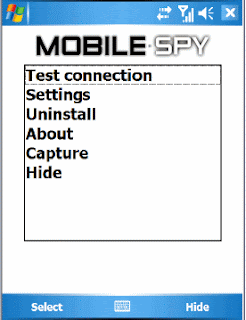
mobilespy (1)Every day I get a lot of emails from people asking how to spy on cell phone or How to hack a cellphone. To spy on a given cell phone all you need to do is install a good cell phone spy software on the target cell phone and once you do this you can silently record every SMS and information about each call. You can also see GPS positions every thirty minutes. Therefore we come with an intelligent software named as Mobile spy.

Mobile Spy is the next generation of smartphone spy software. Do you suspect that your child or employee is abusing their SMS or vehicle privileges? If yes, then this software is ideal for you. Install this small program directly onto your compatible smartphone you want to monitor to begin recording.Using the Internet capabilities of your phone, recorded activities, logs and GPS locations are quickly uploaded to your Mobile Spy account. To view the results, you simply login to your secure account at the Mobile Spy web site. Logs are displayed by categories and sorted for easy browsing.The software is completely stealth and works independently. Mobile Spy does not rely on the phone's call and message logs to record activities. So even if the user tries to delete their tracks, the data will still be retained and uploaded. Compatible with most models of iPhone, BlackBerry or Android phones! Also compatible with Windows Mobile, Symbian OS and iPad.


Why Mobile Spy?
There exists many cell phone spy softwares on the market and hence people often get confused about which cell phone spy software to go for. To make this job simpler for you we personally tested some of the top cell phone spy software's and based on the results we conclude Mobile Spy as be the best one.


Here is an overview of the entire process:

Mobile Spy is a hybrid software/service which allows you to monitor your smartphone in real time. This unique system records the activities of anyone who uses your compatible iPhone, BlackBerry, Android, Windows Mobile or Symbian OS smartphone. You install a small application onto your phone. It starts at every boot of your phone but remains stealth and does not show up in the running process list.
After the software is setup on your phone it will record an array of phone activities and then silently upload the data to your private Mobile Spy account using the Internet. When you want to view results, simply login to the Online Control Panel from any computer and enter your username and password to proceed.
Mobile Spy Features:

This powerful system gives you the ability to spy a cellphone and to monitor activities online in real time. Your logs are safely stored in your https-SECURED Mobile Spy account which is accessible only by you from any web browser using a username and password you create.
You can login anytime from any location to view results without needing access to the phone. The activities recorded are each described below. All activities include a date/time stamp and are searchable by phone number. All logs can be easily exported to CSV for importing to your database!
Calls Log
Each incoming and outgoing number is logged along with duration and time stamp.
SMS (Text Messages) Log
Every text message is logged even if the phone's logs are deleted. Includes full text.
GPS Locations Log


The device's current location is frequently logged using GPRS when signal available.
Web Site URLs Log
Each address visited in browser is logged. This feature is currently for iPhones only.
Log Summary
A summary of all activities can be shown along with separate viewers for each type.
The working of Mobile Spy is very simple and needs no extra knowledge to install and use.
Step 1- After you purchase Mobile Spy you’ll get a link to download the software. Along with this you’ll get a username and password for you online control panel.
Step 2- Install the downloaded cell phone spy software onto the target cell phone that you want to spy on. After the installation, spy software starts recording all the activities on the cell phone.
Step 3- Login to your online control panel to see the logs containing the recorded information.
Mobile Spy is fully compatible with the following cell phones
BlackBerry Phones
Android Phones
Apple iPhones
Windows Mobile Phones
Symbian OS 9.x and 8.x phones

Click Here for the Complete List of Compatible Phones. For more info on this product visit the Mobile Spy homepage with the link below Mobile Spy Homepage
So what are you waiting for? Go grab Mobile Spy now and start spying on any cell phone within hours. Visit the following link to order Mobile Spy Now!
Mobile spy - The Cellphone monitoring software

Download Here


03 April 2011

PayPal Hacking - Bypass PayPal payment to get Free Products Online


paypal_logo_sale.03Its being a long time since I have posted an article on my site so today by managing some time I founded a JavaScript which can be very helpful in downloading online products for free selling by other peoples or merchants which are on the payment seats.Its being a trend to sell eBooks,software's,games,links,products etc. online on the internet to earn some money. If we need something like that we have to give them payments through our PayPal accounts.Therefore, to solve that problem and make easy to poor people to afford that items PayPal hacking script is being launched.

Here is the Script-

javascript:top.location=document.getElementsByName('return')[0].value; javascript:void(0);

Steps needed to get free products-

1.First of all copy the script given above

2.Then open that website where the means of purchase is PayPal . For ex- www.ptcexpert.com.

3.Click on the PayPal button to purchase item and

3.In-between the loading time of PayPal payment by your account, Copy paste the JavaScript in the browser and press enter or you can directly paste the script in the browser address when the website opens.

4.you will be redirected to the downloading section.

5.That’s it!!!, you hacked that system.

Note-

It works well with the supported web-browsers like Google chrome,Firefox,opera,safari,ie etc. Sometimes the script wont work due to some strong security arrangements,Then you will try some other website.

Disclaimer-

I hold no responsibility for any kind of your actions to this script, Its being made only for educational purposes.

Enjoy Hacking !                                                                                                                                                                    Plz comment upon the websites you found which are hackable by this script.


22 March 2011

Download Any Website to your HDD using Offline Explorer Pro


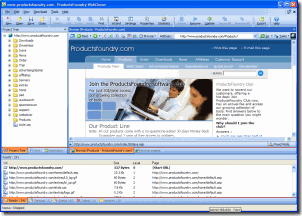
images (4)Now a days many of us are facing network problems due to bad communications,cable lines or resources. When we want to do something or surf on internet there exists problems such as page cannot be displayed or network related issues.Therefore to solve this problem today I am giving you a software named as Offline Explorer pro which can download any website to your hard disk when internet is on and can be displayed anytime by you.Offline Explorer Pro is the next generation of offline browser. It combines flexibility, power and ease of use in a tightly-coded package with all the features needed in an offline browser. This software is created by the team of metaproducts.com.

Features-

  • Very fast, easy and reliable file retrieval from the Web (including FTP, HTTP, HTTPS, MMS, PNM and RTSP sites)

  • HTTP, SOCKS4, SOCKS5 and User@Site Proxy support. Proxy settings auto detection. Detect proxy settings from a configuration URL.

  • Download up to 500 files simultaneously. Each Project downloads in parallel with others. It is possible to configure the number of downloading connections for each Project and even pause Project downloads.

  • Reget capability for HTTP, HTTPS, FTP and RTSP downloads.

  • Downloaded web sites may be viewed by using your external browser or by using our Internal Browser. (Note: this option requires MSIE 3.02 or higher.). Internal browser supports unlimited number of tabs for simultaneous browsing of Web pages.

  • Downloaded Web pages may be printed from the Internal Browser. It is also possible to print the whole site at once.

  • Downloaded Web sites may be published on the Web or exported to any other directory

  • Internal editor with syntax highlight for HTML, CSS and JavaScript files

  • Optional random delays between downloading each file to simulate human browsing

  • Since Offline Explorer Pro uses relative paths translation, downloaded files can be easily relocated

  • Supports Drag-and-Drop links from Browsers

  • Monitors Clipboard for manual or automatic creation of new Projects

  • Fully configurable user interface (including toolbar) with a handy New Project Wizard

  • Will run in the background

  • Provides support and extracts links from Java and VB Scripts, Java Classes, Cascading Style Sheets (.CSS), Macromedia Flash (.SWF), XML/XSL/DTD, Table Of Contents (.TOC), MPEG 3 Play List (.M3U), Authorware (.AAM), Acrobat (.PDF), RealMedia (.SMIL, .RAM, .RPM), VRML (.WRL, .WRZ), QuickTime video (.MOV), WAP pages and MS NetShow Channel (.NSC) files

  • Processes JavaScript calculations to find even more links

  • The only offline browser that fully supports all known XML technologies, including XSL and DTD files

  • Supports use of MS IE cookies while downloading

  • Multiple Project Templates make new Project creation simple

  • Downloaded sites easily exported to another location in required format or added to a ZIP, MHT or HTML Help (.CHM) file (Pro and Enterprise editions)

  • Built-in Backup/Restore projects

  • Search through downloaded files for keywords in filenames or in HTML text. Found keywords are highlighted in the search summary list and in found Web pages when you browse them.

  • Multiple Projects selection allows fast operations on the Projects tree

  • Internal Dialer with ability to disconnect or shutdown computer automatically when download is complete

  • Flexible URL Filters with powerful keyword support to fine tune your downloads

  • Download speed control

  • Downloads can be scheduled, sequenced or started from the command line

Offline Explorer Pro adds even more features for better downloading, offline browsing and processing of Web sites.

Offline Explorer Enterprise adds the ability to handle up to 100 million URLs in a single download session while using minimum memory and OLE/COM automation code to control Projects and downloads from other programs.
wc2

How it could be useful for you:

  • It will save connect charges because you will download the Web site you want at the highest possible speed and browse it offline with no Internet connection necessary.

  • It saves your time because Offline Explorer Pro downloads up to 500 files simultaneously. Browsing from your hard disk is much faster than from the Internet, even if you have a cable connection.

  • It saves your nerves because downloaded Web sites are accessible at any time even if the Web site is not working, or has been moved or altered by hackers.

  • You can take the Web site with you if you travel with your laptop computer. You can have the Internet you want even when flying.

  • Many Web sites change rapidly and it is hard to find information that was there before. With Offline Explorer Pro, you can make an archive of files that are interest you and access them at any time, even if the original Web site no longer exists.

  • A powerful Export feature of Offline Explorer Pro allows you to share downloaded files with other people, transfer them to other computers or even make Web sites for burning to CDs. There is even an option to make Autorun CDs, so when you insert the CD into the CD-ROM drive, your computer will open the downloaded Web site automatically. This is especially good if you plan to take data from your Web site to show at somewhere else, as you will not need Offline Explorer Pro. Such a CD could be viewed under any operating system, such as Mac OS or Linux.

  • Thanks to the powerful scheduling feature, you can automatically monitor Web sites and download changed information. Offline Explorer Pro also includes a unique Schedule Manager that easily displays the process of making your schedule. Just use drag-and-drop to assign a time to check the Web site to any Project. To further automate tasks, Offline Explorer Pro Pro edition has the ability to use macros in starting address that will download different URLs according to the day, time, weekday, month or year. You can also set up Offline Explorer Pro to dial the Internet when necessary and hang-up the connection, exit itself or shut down the computer once all downloads complete.

  • If you have an Intranet, you can easily share downloaded Web sites with your colleagues without a need to transfer files. Offline Explorer Pro has an internal Web server that allows browsing of downloaded sites on other computers.

Professionals will enjoy the following abilities of Offline Explorer Pro:

  • It is possible to download the whole site as is for editing and later uploading it back.

  • With the Offline Explorer Pro Pro edition you can analyze and post-process (data mine) a downloaded Web site. Offline Explorer Pro is capable of passing downloaded Web sites to the powerful TextPipe tool that will perform all necessary manipulations to extract or change the desired data, or even to pump it to a database.

Why Offline Explorer Pro?

  • It has an excellent user interface that combines ease-of-use and power. You will find it simple and understandable while containing everything you need to complete even the most difficult downloading tasks.

  • Offline browsing is very easy with Offline Explorer Pro thanks to its Internal Web browser. You may print downloaded Web pages directly from Offline Explorer Pro. Various external browsers are also supported and automatically recognized - MS Internet Explorer, Netscape Communicator, Opera, NetCaptor.

  • Offline Explorer Pro supports most modern Internet technologies. Many Web sites contain Java scripts, Java classes, require cookies, post requests, referrers, Style Sheets (CSS), Macromedia Flash, XML/XSL files, Contents (.TOC), MP3 list (.M3U), Authorware (.AAM), Acrobat (.PDF), RealMedia (.SMIL, .RAM, .RPM), VRML (.WRL, .WRZ), QuickTime video (.MOV) and MS NetShow Channel (.NSC) files. Offline Explorer Pro not only downloads these files, but also processes them to extract links and change them for offline browsing. Thus, you get the most complete Web site version that is highly prepared for offline browsing.

  • You can download not only Web sites, but also FTP, secured (HTTPS) and streaming (MMS, PNM, RTSP) sites. Various proxy servers are also supported, giving you access from inside a firewall or Intranet - HTTP, SOCKS 4/5, RTSP, User@Site. Download speed is the highest among offline browsers, because Offline Explorer Pro is capable of downloading up to 500 files simultaneously.

  • Offline Explorer Pro is the best when downloading protected Web sites because it supports HTTP and NTLM authorization, can submit logon forms, supports cookies and referrers. It is also possible to submit custom forms using the new feature in Internal Browser.

  • Adding a new Project is flexible and easy. You can use a Wizard, import from Favorites, Bookmarks, Hot lists, drag-and-drop links from browsers, paste them from the clipboard, use the context menu in MS Internet Explorer, add instantly from the Address bar and others. Multiple Project templates simplify routine new Project tasks.

  • Downloaded Web sites are stored in their native format rather than proprietary databases or formats. All links are made relative, so it is easy to move them to another place or even publish on your own Web server.

  • You have full control while downloading. Any Project allows you to specify which file types to load and which to skip, based on their extension, size, location. You can use keywords to specify servers, directories or filenames to be allowed or disallowed for downloading. You can abort any file download simply by right clicking on it. Offline Explorer Pro Pro and Enterprise editions allows you to manage the download queue. You can run, stop, suspend and resume downloading, save it to a file to continue later from exactly that point.

  • We focused on handy Projects management. You see all Projects (downloading tasks) at once on the screen. Any number of Projects could be started for downloading at the same time. You can group them by folders. You can add, edit, delete, copy, paste, backup, restore, search or export Projects and folders. You can view the Site Map of any downloaded Project and manage it.

  • It is possible to preserve old downloaded files, keeping up to 10,000 copies of older files.

Getting Started

After Offline Explorer Pro is installed and running for the first time there are three simple steps to offline browsing.

Step 1. Creating a new Project for downloading.

The Project defines from which web page the download should start and how many pages Offline Explorer Pro should download for you.

By default you get a New Project Wizard screen when you run Offline Explorer Pro. If it doesn't show, click the Wizard button on the Ribbon - Home tab and follow the steps to create a Project. At the end of the Wizard you will be prompted to start downloading the new Project. The newly created Project will be added to the Projects tree on the left side of the Offline Explorer Pro screen.

Step 2. Waiting for the download to complete.

The new Project will be created and will start downloading. The green arrow on the Project icon indicates that the download goes on. When the download completes the green arrow disappears.

Once the download has been started, Offline Explorer Pro begins loading files referenced by the Project URL (starting address). Every link in the file is checked against the limits set in the Project Properties: Level, File Types, File Sizes, URL Filters, etc. Since Offline Explorer Pro downloads a limited number of files at one time, other files are placed in the Queue to wait for the download. The Status bar displays the number of processed (downloaded) files and the number of files waiting in the Queue. When all files are downloaded and no files are left in Project Queue, the Project download is complete.

Step 3. Viewing downloaded files offline.

Now the web site is available for browsing off line. Right-click the downloaded Project and select Browse. Offline Explorer Pro will detect the best way to display the site, either in Internal browser or in your default WWW browser.

You may repeat steps 1-3 at any time. Offline Explorer Pro supports creation of an almost unlimited number of Projects, which could be downloaded in parallel.

For more details about working with Offline Explorer Pro, go to the Using Offline Explorer Pro section.

Download Here

This is the release version of Offline Explorer Pro 5.9. Future releases may be found on our web site at: http://www.metaproducts.com.

Current Version - 5.9.3318

Required operation system: Windows 2000/XP/2003/Vista/7.


17 March 2011

How to Hack Website Using Havij- An SQL Attack?


sqlinjection

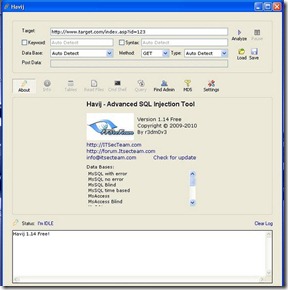
Havij is an automated SQL Injection tool that helps penetration testers to find and exploit SQL Injection vulnerabilities on a web page.It can take advantage of a vulnerable web application. By using this software user can perform back-end database fingerprint, retrieve DBMS users and password hashes, dump tables and columns, fetching data from the database, running SQL statements and even accessing the underlying file system and executing commands on the operating system.

The power of Havij that makes it different from similar tools is its injection methods. The success rate is more than of 95% at injecting vulnerable targets using Havij.

The user friendly GUI (Graphical User Interface) of Havij and automated settings and detections makes it easy to use for everyone even amateur users.

Disclaimer

We are NOT responsible for any damage or illegal actions caused by the use of this program. Use on your own risk!

Features-

1. Supported Databases with injection methods:

          MsSQL 2000/2005 with error

          MsSQL 2000/2005 no error union based

          MsSQL Blind

          MySQL time based

          MySQL union based

          MySQL Blind

          MySQL error based

          MySQL time based

          Oracle union based

          Oracle error based

          PostgreSQL union based

          MsAccess union based

          MsAccess Blind

          Sybase (ASE)

          Sybase (ASE) Blind


2. HTTPS Support
3. Proxy support
4. Automatic database detection
5. Automatic type detection (string or integer)
6. Automatic keyword detection (finding difference between the positive and negative response)

7. Trying different injection syntaxes
8. Options for replacing space by /**/,+,... against IDS or filters
9. Avoid using strings (magic_quotes similar filters bypass)
10. Manual injection syntax support
11. Manual queries with result
12. Bypassing illegal union
13. Full customizable http headers (like referer,user agent and ...)
14. Load cookie from site for authentication
15. Http Basic and Digest authentication
16. Injecting URL rewrite pages
17. Bypassing mod_security web application firewall and similar firewalls
18. Real time result
19. Guessing tables and columns in mysql<5 (also in blind) and MsAccess
20. Fast getting tables and columns for mysql
21. Executing SQL query in Oracle database
22. Getting one row in one request (all in one request)
23. Dumping data into file
24. Saving data as XML format
25. View every injection request sent by program
26. Enabling xp_cmdshell and remote desktop
27. Multi thread Admin page finder and Online MD5 cracker
28. Getting DBMS Informations
29. Getting tables, columns and data
30. Command executation (mssql only)
31. Reading system files (mysql only)
32. insert/update/delete data

havij1

What's New?

  • Sybase (ASE) database added.
  • Sybase (ASE) Blind database added.
  • Time based method for MsSQL added.
  • Time based method for MySQL added.
  • mod_security bypass added.
  • Pause button added.
  • Basic authentication added
  • Digest authentication added.
  • Post Data field added
  • bugs related with dot character in database name fixed
  • syntax over writing when defined by user in blind injections fixed.
  • mssql database detection from error when using JDBC driver corrected.
  • time out bug in md5 cracker fixed.
  • default value bug fixed
  • string encode bug fixed in PostgreSQL
  • injecting URL rewrite pages added.
  • injecting into any part of http request like Cookie, User-Agent, Referer, etc made available
  • a bug in finding string column fixed. (specially for MySQL)
  • Finding columns count in mysql when input value is non effective added.
  • window resize bug in custom DPI setting fixed.
  • some bugs in finding row count fixed.
  • getting database name in mssql error based when injection type is guessed integer but it's string fixed.

How to use it?

This tool is for exploiting SQL Injection bugs in web application.

For using this tool you should know a little about SQL Injections.

Enter target url and select http method then click Analyze.

Note: Try to url be valid input that returns a normal page not a 404 or error page.

Download


How to Hack PTC Websites using Multiclicker?


aajeb7

I recently wrote an article on How to make money online with Neobux  - one of the best PTC program ever in my view or history.Today I am going to tell you a software named as PTC Multiclicker which is used to hack PTC sites like www.bux.to, www.clicksense.com, www.worldofbux.com, www.fairbux.com, www.buxxp.info, www.cashmybux.com, www.palmbux.com, www.bux3.com, www.paid-bux.info, www.max-ptc.com and many more.

What are PTC websites?
PTC means ‘Paid To Click’  and PTC websites are that sites which pay you money just for  viewing their advertisements by clicking. You have to view each ad for atleast 15-30 seconds and these PTC sites pay you around $0.01-$0.02 and some times even lesser than that.

When and How do i get paid?
You get paid once you successfully reached the minimum cashout or payout set by the PTC website you are using.
You can get paid through Paypal,Alertpay,Neteller,Liberty reserve etc.I personally recommend you using Paypal and Alertpay because they are safe and available in more than 190 countries.

What is Muticlicker and what does it do?
Multiclicker is a PTC hacking application which automatically log in to your PTC account and starts clicking ads automatically  on PTC sites which is normally done by you. Thus, you have to rest back and Multiclicker starts making money for you.


How to hack PTC sites with Multiclicker?
To use multiclicker for PTC hacking just follow the steps:
Step 1:
Download Multiclicker software to hack ptc sites.

PTC hacking

Step 2
Extract the folder to view the files using Winzix.


Step 3:
Now just start using multiclicker software to make money online.

Enjoy!


13 March 2011

Top 10 Best Facebook Hacks 2010-2011


facebook1With the success of my new book on ‘Learn Facebook Hacking’ in the market, today I am going to tell some more facebook hacks to all my readers. Now a days facebook takeovers the Orkut,hi5,twitter and more due to its amazing technology of chatting and apps,People are now shifted from various social networking sites to facebook and get benefited . Due to this,FB hacking is becoming common and hackers are more concentrating on their skills.Sometimes if you want to see or do something with your friends for joy and fun but you are going to not to do because he/she will lock that feature with privacy.Therefore now I am going to introduce you all my latest collection of top 10 best facebook hacks.This will make more fun and easyness to you while online.

List of Top 10 Facebook hacks-


1.How to View the Album of Any User Even if it is Private
You can use this script to view a photo in the original album, even if you’re not friends with the person.
Get it Here

2. How to Remove Annoying Facebook Advertisement
Get rid of some of the Facebook advertising and sponsored by sections with this tool.
Get it Here


3. How to see Real Profiles from Public Pages
This script redirects to real profiles from the Facebook people pages (public profiles). There is a risk of an infinite redirect loop if not logged in, so be logged in.
Get it Here


4. How to Undo Facebook Changes
If you hate some or all of the new Facebook changes, undo them with these scripts and use what you liked previously.
Get it Here


5. How to View All the Photos from a Person
You can search for pictures of a Facebook member who has tight privacy settings and view all his/ her pictures without his/ her consent.
Get it Here


6. How to Find More Friends at Facebook
Suppose some of your friends have newly joined Facebook and you didn’t even knew. Use this script and it will help you go through your friends’ friends list and find them out.
Get it Here


7. How to Share Files from Facebook
With this box widget, you can share files from your computer through Facebook. Isn’t it great?
Get it Here


8. How to Get a Job from FacebookLooking for a job?
This application gives Facebook users unique access to job information, networking opportunities and other career resources.
Get it Here


9. How to Tighten up the Privacy and still Maintain Communication Convenience
The Private Wall combines the best of both worlds of Facebook: online convenience and communication with more serious privacy settings.
Get it Here

10 How to Cheat Facebook Texas Hold em Poker
This is one of my Favorite hacks and that is why I have saved it for the last one. Using this software you can see the cards of any player and the advanced version of this software allows you to even add credits to your account for free.
Get it Here

That’s it !


08 March 2011

How to find a Vulnerable Website and Start Hacking?


14913_NpAdvHover

Now a days Website Hacking has become a tradition or fun to create problems for other people. Hackers are searching for finding the holes in the websites having high page ranks and traffic. Who knows what the hackers are going to do or their next target is on your site? Few years back there is not so much terror of being website hacked because at that time there is not so much of powerful tools developed by humans, but now the time is that even a newbie can find a vulnerable website and start hacking.

Audit your website security with Acunetix Web Security Scanner

Website security is possibly today's most overlooked aspect of securing the enterprise and should be a priority in any organization. Hackers are concentrating their efforts on web-based applications - shopping carts, forms, login pages, dynamic content, etc. Web applications are accessible 24 hours a day, 7 days a week and control valuable data since they often have direct access to backend data such as customer databases.

Firewalls, SSL and locked-down servers are futile against web application hacking

Any defense at network security level will provide no protection against web application attacks since they are launched on port 80 - which has to remain open. In addition, web applications are often tailor-made therefore tested less than off-the-shelf software and are more likely to have undiscovered vulnerabilities. Acunetix WVS automatically checks your web applications for SQL Injection, XSS & other web vulnerabilities. 


Commonly used Tool to find a vulnerable website

Acunetix-


Acunetix is the world’s best tool developed to find a venerability in any web application as It automatically checks your web applications for SQL Injection, XSS & other web vulnerabilities.

Acunetix Web Vulnerability Scanner includes many innovative features:

  • An automatic client script analyzer allowing for security testing of Ajax and Web 2.0 applications
  • Industries' most advanced and in-depth SQL injection and Cross site scripting testing
  • Advanced penetration testing tools, such as the HTTP Editor and the HTTP Fuzzer  
  • Visual macro recorder makes testing web forms and password protected areas easy
  • Support for pages with CAPTHCA, single sign-on and Two Factor authentication mechanisms
  • Extensive reporting facilities including VISA PCI compliance reports
  • Multi-threaded and lightning fast scanner crawls hundreds of thousands of pages with ease
  • Intelligent crawler detects web server type and application language
  • Acunetix crawls and analyzes websites including flash content, SOAP and AJAX
  • Port scans a web server and runs security checks against network services running on the server 


Download Acunetix Web Security Scanner

Enjoy!


24 February 2011

See the Power of Javascript–Make Websites Fly In The Browser


javLots of people think that the Javascript is an inferior and poor language but they really don’t know how  extreme powerful language is it of and those people who think the other way they either don't know how to use it or are not familiar with it's capabilities, With javascript you can do lots of cool things such as edit any page, make an image fly etc, but it is a waste of time to spend your time on making images fly with javascripts or editing a page.
Anyways coming to the main topic, did you know that javascript can be used for making websites fly in the air, well if you don't know just paste the following code in to the address bar and see the magic.

javascript:R=0; x1=.1; y1=.05; x2=.25; y2=.24; x3=1.6; y3=.24; x4=300; y4=200; x5=300; y5=200; DI=document.getElementsByTagName("body"); DIL=DI.length; function A(){for(i=0; i-DIL; i++){DIS=DI[ i ].style; DIS.position='absolute'; DIS.left=(Math.sin(R*x1+i*x2+x3)*x4+x5)+"px"; DIS.top=(Math.cos(R*y1+i*y2+y3)*y4+y5)+"px"}R++}setInterval('A()',5); void(0);

Enjoy!


20 February 2011

How to Convert PDF File To MS Word?


Pdf File to MS Word Convertion -

createpdftowordtables_1

After pdf to image converter, its time to convert Pdf to Word file online and enhanced software to do this.There are many websites avaliable for the same purpose.This method contribute a lot of help and easiness for the business purposes,office work and children projects also.Some of them are..

1.http://www.pdfonline.com/pdf2word/index.asp

“[PDF Online] provides the best quality PDF to Word conversion; will produce a download link instantly and will not keep you waiting.

2.http://www.convertpdftoword.net/

Easily convert between Word, PDF or any other document format. Free to try!

3.http://www.pdftoword.com/

Using our PDF-to-Word conversion technology, you can quickly and easily create editable DOC/RTF files, making it a cinch to re-use PDF content in applications like Microsoft Word, Excel, OpenOffice, and WordPerfect.

Plz share it with your Friends…


Recent Posts

Review this blog on Bloggers.com

Recent Comments

| KrackoWorld (KoW) © 2014. All Rights Reserved | Style By All Web Designing | | Contact |